It is 20:14 and three people think they know what is next.
The caller has the paper order. The LX tech has a photo of an older one. Somebody is asking over comms what cue they are on. Show Ops replaces all of that with one server-held pointer that every screen reads — and only one person can move.
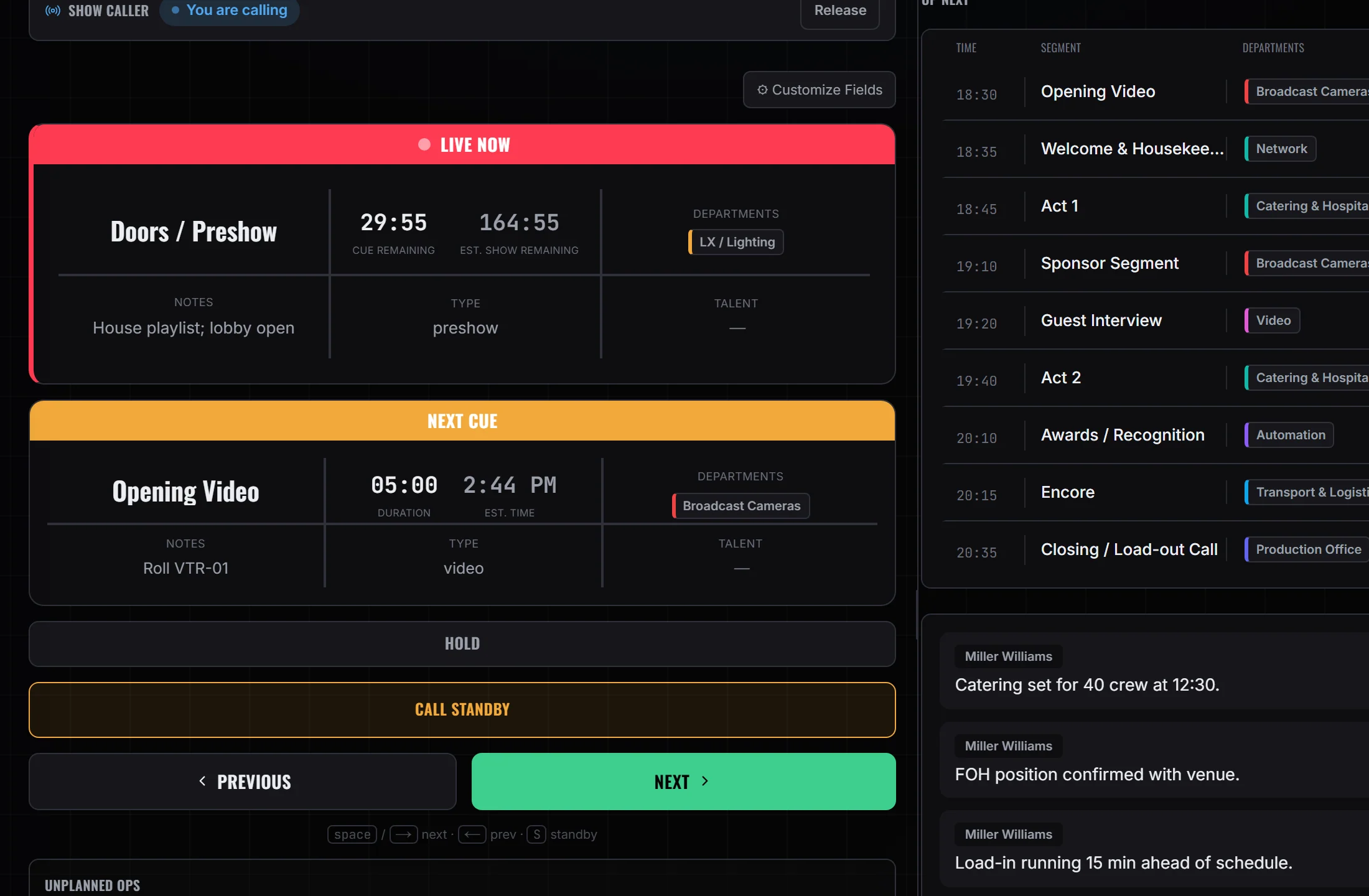
One pointer, two screens. Only the person holding the call can move it — everyone else, on any device, is reading the same cue, the same clock and the same one queued behind it.
From taking the call to the last reconnect.
The whole evening, in the order it happens.
- 19:58
Someone takes the call
Show CallHolding the call is a deliberate act, and only one person holds it. Every standby, GO and hold is checked against who is holding it, so a full-access producer who is not sees read-only controls and a Take over call button rather than a GO the server would refuse. - 20:03
The prompter is armed from the rundown
PrompterTalent script goes up on a second display. It arms from the on-deck cue rather than being scrolled by a separate person to a separate plan, so the words and the cue cannot drift apart. - 20:11
Standby warns the room — and fires nothing
Show CallCalling standby moves the standby pointer and warns everyone reading the show. That is all it does. The caller can warn without committing, which is the entire reason the two acts are separate. - 20:14
GO puts the cue on air
Show CallThe separate GO advances the on-air pointer and arms the cue behind it. Press GO at the end of the rundown and it returns a reason — end of rundown — and the desk says so in plain words instead of looking like it worked. - 20:14
Every phone already knows
Crew portalThe live state carries the on-air cue, the standby cue, a server anchor and banked elapsed time. Crew screens interpolate their display from that. None of them run their own clock, and none of them can advance the cue — they are readers of one pointer, not copies of it. - 20:31
Something happens, and the plan is already on this show
Emergency OpsAED locations, evacuation routes, emergency contacts, the action plan and incident reports sit on the same event as the rundown, with live radar for the site. It is the plan and the record — it does not declare anything, and it does not notify anyone. - 20:52
A reconnect comes back where it left
Show CallHolding banks the elapsed time server-side and resuming re-anchors it, so a laptop that drops and rejoins is frozen on the same number rather than jumping forward. After 45 seconds of silence the surface says the live feed is unreachable and keeps showing the last known state, rather than presenting stale numbers as current.
What holds up when the room is loud
- Standby and GO are two actsCalling standby moves the standby pointer and warns the room. It fires nothing. The separate GO puts the cue on air and arms the one behind it — so a caller can warn without committing.
- One caller, and the server decides whoEvery standby, GO and hold is checked against who is holding the call. A full-access producer who is not sees read-only controls and a Take over call button, rather than a GO the server would refuse.
- A press that changed nothing says soGO at the end of the rundown, or standby with nothing to arm, returns a reason — end of rundown, nothing to standby — and the desk says it in plain words instead of looking like it worked.
- Followers don't run their own clockThe live state carries the on-air cue, the standby cue, a server anchor and banked elapsed time. Every other screen interpolates the display from that; none of them advance the cue on their own.
- Hold survives a reloadHolding banks the elapsed time server-side and resuming re-anchors it, so a reconnect comes back frozen on the same number rather than jumping forward.
- A dead feed is labelled, not hiddenAfter 45 seconds with no traffic the surface says the live feed is unreachable and keeps showing the last known state — it does not quietly present stale numbers as current.
- Director modeThe camera and cue call sheet, with a countdown to the next cut
- PrompterTalent script, armed from the on-deck cue, with a talent display that checks in separately
- Crew ViewThe same rundown, filtered to one department
- Emergency OpsAED locations, evacuation routes, contacts, action plan and incident reports
Radar centred on the venue you advanced.
The emergency surface carries a radar map on coordinates geocoded from the venue address, with the National Weather Service's active warning polygons drawn over it.
- Coordinates are stored next to the address they were geocoded from. Change the venue address and the site counts as moved — re-centred automatically, or offered as a choice when a human typed the location.
- Radar, the National Weather Service warning polygons and an hourly forecast run with no account of your own. Storm-cell vectors, future radar and lightning need your own provider keys, and are hidden rather than shown as locked panels.
- For an outdoor site you set a shelter radius, an evacuate radius and an all-clear wait. A strike inside a ring raises the matching banner and runs the countdown; the call is still a button a human presses.
- Declaring shelter, evacuate, show stop or weather hold writes the status and an attributed note onto the show, then sends one browser push to the crew staffed on it — reporting back how many devices accepted it, or that nobody was reachable. It is a banner and a push, not an alarm — radio and PA stay the primary channel.
Show Ops does not drive your hardware
It is a calling surface, not a show-control system. It does not read timecode — no LTC, MTC or SMPTE — and it speaks no MIDI, OSC or GPIO. It does not drive a switcher, a media server, a lighting desk or playback, and it is not an intercom. There is no cue automation: no auto-advance, no follow timers. Every GO is a human pressing a key.
If you need a cue to fire a device, it still fires from the desk that owns that device. What changes is that everyone is looking at the same list while it happens.
A weather call reaches phones as a browser notification, which needs push keys set on your deployment and each person to have turned notifications on for that device. There is no SMS and no phone call, so the app reports how many devices took it rather than telling you the room has been warned.
Who is on it with you
See it on a real show week.
Build the rundown, then call it. Standby, GO, hold and step-back.